Shopping List: BigBag Pro
- 4.8
- Rating
- 10.00K
- Installs
- $4.99
- Price

 Analysis by App-foxy
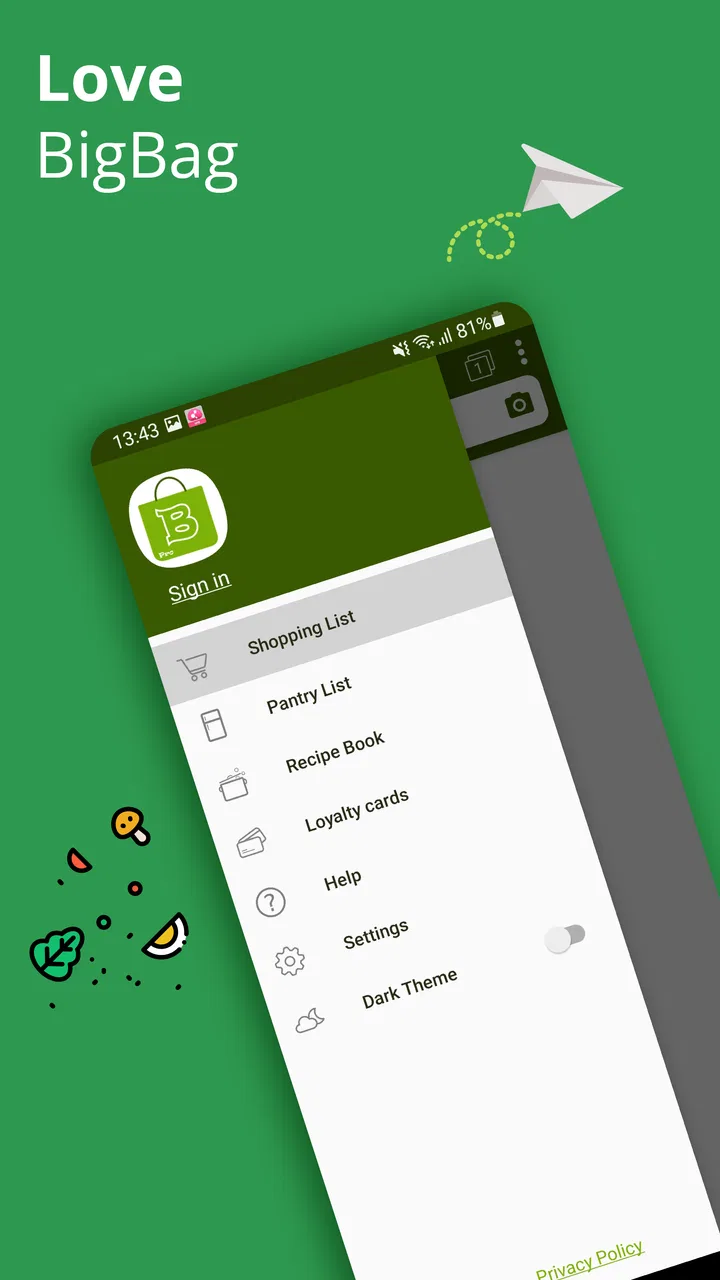
I have tried plenty of shopping-list apps that looked useful at first and then became little more than a place to type “milk” and “bread.” Shopping List: BigBag Pro aims higher. It brings shopping lists, pantry tracking, recipes, and loyalty cards into one shopping-focused app, which makes it more interesting than a basic checklist. My impression is that it works best for people who want one practical home-shopping system rather than several disconnected tools.
The important question is whether that broader approach is worth paying for. BigBag Pro is a paid app listed at $4.99, so it should be judged as a purchase rather than as a free download with optional extras. Its average rating is 4.8 from around 266 ratings, and it has passed 10K+ installs. Those numbers suggest a small but notably positive user base, although they do not replace hands-on consideration of how well the app fits your routine.
How the all-in-one shopping approach works
The app is developed by Smart shopping lists and belongs to the Shopping category. Its central idea is simple: the things I need to buy, the food already at home, the recipes I use, and the loyalty cards I carry can all live in the same place. That combination is more useful than it sounds because grocery planning rarely begins and ends with a single list.
You May Also Like

 AccuWeather: Weather Radar
AccuWeather Review: A Quick, Clear Forecast for Everyday Decisions
For everyday plans, the best forecast is the one you can understand quickly. AccuWeather makes rain timing, radar, and local conditions easy to act on, with a few trade-offs.

 Hill Climb Racing
Why Hill Climb Racing Still Turns Crashes Into One More Run
A tiny car, a bumpy hill and one more upgrade: Hill Climb Racing keeps resurfacing because its simple chaos makes every near-miss feel personal.

 AliExpress - Shopping App
AliExpress Makes Global Shopping Feel Personal, but Shoppers Bear the Risk
AliExpress turns a global marketplace into a pocket-sized discovery engine. Its reach is useful, its shopping loop compelling, and its trade-offs easy to miss.

 Lords Mobile: Kingdom Wars
Lords Mobile Is a Kingdom-Building Routine, Not a Quick Match
A case-by-case verdict on the building, battles, device demands, and social commitments that make Lords Mobile rewarding for some players and exhausting for others.

 PDF Scanner app - TapScanner
TapScanner Makes Paperwork Easier to Capture, Check, and Share
TapScanner makes scanning with a phone feel less like a rescue operation and more like a dependable step in getting work done. Its capture tools are useful, though not flawless.

 Block Blast!
 Shows How Much a Puzzle Game Can Leave Out
A quiet grid game shows why puzzle players increasingly value instant clarity, repeatable skill and low-pressure play—and where the genre still needs to catch up.
More From Our News Desk
View All News


A normal shopping-list app usually handles the final stage: I remember an item, write it down, and check it off in the store. BigBag Pro is designed for the stages before that as well. Pantry information can help me notice what I already have, while recipes can turn meal ideas into a more deliberate buying plan. Loyalty cards address a different kind of shopping friction, keeping those cards close when I reach the checkout.
I would not describe this as a full household-management platform. Its appeal is narrower and more practical. It is built around shopping, and each extra section supports that purpose. The result is potentially less jumping between apps, especially for someone who plans meals and shops for a household regularly.
The app is rated for Everyone, which makes its intended audience broad. It runs on Android from version 5.0 onward, and the current version is 12.4. That compatibility is useful for people who keep an older phone, although the experience will still depend on the device and operating system in everyday use.
More than a list, but not automatically better
The biggest strength is the relationship between the sections. A list is most helpful when it reflects a plan, and a plan is more realistic when it considers pantry contents and recipes. For example, I can think about a dinner, check whether a key ingredient is already at home, and then add only what is needed. That is a more disciplined workflow than adding ingredients from memory and discovering duplicates later.
There is also a useful distinction between items I intend to buy and items I already possess. Keeping those ideas separate can reduce the common problem of buying a second jar simply because the first one was hidden behind other groceries. The pantry area is therefore not just an extra feature; it can change how I prepare a list before leaving home.
The loyalty-card area adds convenience in a different way. It does not improve meal planning, but it can reduce the number of separate apps or physical cards I need to remember. For someone who visits several stores, having shopping-related material gathered together may feel cleaner than searching through a wallet or switching between retailer applications.
My practical advice is to set up the app around repeatable shopping patterns rather than trying to record the entire kitchen immediately. Start with the items you buy often, the pantry staples that cause duplicate purchases, and the recipes you genuinely use. This makes the app useful sooner and avoids turning the initial setup into a tedious inventory project.
A realistic weekly routine
Imagine planning several weekday meals on a Sunday evening. I would begin with the recipes I expect to cook, then compare their ingredients with the pantry list. Items already available can stay out of the shopping list, while missing ingredients can be added to the next trip. Before going to the store, I would review the list for forgotten household essentials and keep the relevant loyalty card ready.
At the shop, the list becomes the active part of the experience. I can work through it aisle by aisle in whatever order suits the store, rather than relying on memory. When I get home, the pantry information becomes useful again because the purchases can inform what is available for the next meal plan. This loop is the main reason to choose BigBag Pro over a plain note-taking app.
There is a less obvious benefit here: the app can encourage better separation between planning and impulse buying. If I prepare the list from recipes and pantry checks, I have a clearer reason for each item. That will not eliminate spontaneous purchases, but it can make the weekly shop feel less random and reduce the mental load of remembering everything.
What the paid price means for value
The verified purchase fact is straightforward: the app costs $4.99. That puts the decision in a different category from downloading a free checklist and trying it without financial commitment. The price is modest as a one-time-style app purchase would be, but the available facts do not establish a subscription model, trial arrangement, family-sharing option, or separate in-app charges, so I would check the purchase screen on my device before committing.
For me, the value depends on whether I will use the connected features. If I only need a short list for occasional errands, paying for a dedicated app is difficult to justify when a basic notes app can handle that job. If I regularly plan meals, track pantry supplies, and carry loyalty cards, the purchase has a clearer purpose because several small conveniences are gathered in one tool.
This is also a case where “all-in-one” can be worth more than a collection of free alternatives. A free notes app, a recipe app, a pantry tracker, and retailer apps may cost nothing individually, but they can create repeated switching and duplicated information. BigBag Pro’s value is not that every part is necessarily deeper than a specialist app; it is that the shopping workflow is more unified.
On the other hand, someone who already has a well-organized system may gain little. If recipes are managed elsewhere, pantry stock is tracked reliably in another app, and loyalty cards are already easy to access, BigBag Pro may duplicate rather than simplify. In that situation, the paid price buys convenience only if the consolidation itself matters.
Where the experience may require patience
The same breadth that makes the app appealing can create setup friction. A simple list takes seconds to create, while pantry and recipe organization asks for more ongoing attention. I would not expect the app to transform shopping habits without some initial discipline. Users who dislike categorizing items or maintaining household information may abandon the extra sections and end up using only the basic list.
There is another trade-off in relying on one app for several jobs. When everything is together, the app becomes more important to the routine, but a problem in one area can make the whole system feel less convenient. Some people may prefer the polish of a specialist recipe service or the store-specific benefits of an individual retailer app. BigBag Pro is strongest as a practical central hub, not necessarily as the deepest tool in every category.
I would also be careful about treating the pantry as perfectly accurate. Any pantry tracker is only as good as the updates made after shopping, cooking, or throwing something away. If I forget to adjust it, the information can become misleading. The best workflow is to update staples when they are purchased and make quick corrections while planning meals, rather than attempting a detailed audit once every few months.
Recipes can create a similar issue. A recipe collection is valuable when it reflects meals I actually cook. Filling it with possibilities that never reach the kitchen adds noise and makes planning slower. I get better results from keeping a smaller, familiar set and using it as a practical source for shopping decisions.
Loyalty cards are convenient, but convenience depends on remembering to open the right part of the app before payment. People who shop at only one retailer may find that the store’s own application offers a more direct experience, particularly if they care about retailer-specific offers or account functions. BigBag Pro’s advantage is centralization, not necessarily retailer integration.
Small workflows that make a difference
One useful habit is to treat the pantry as a filter, not as a museum of every object in the kitchen. I would concentrate on ingredients that are easy to forget or buy twice: dry goods, cleaning supplies, freezer items, and regularly used staples. This keeps the pantry meaningful and makes the recipe-to-list process faster.
A second tactic is to build lists around shopping trips rather than leaving one enormous permanent list. A weekly grocery list, a household-supplies list, and a quick top-up list serve different purposes. Separating them can make a short errand less intimidating and helps me avoid checking every item when I only need a few things.
A third is to use recipes as planning prompts rather than rigid schedules. I can choose a recipe because it uses ingredients already in the pantry, then add only the missing pieces. This turns leftover food into a planning advantage and can be more economical than selecting meals first and buying everything from scratch.
For loyalty cards, I would prepare before entering the store rather than waiting at the checkout. Opening the card section early reduces the chance of holding up the line while searching. That sounds minor, but it is exactly the kind of small routine that determines whether an all-in-one app feels genuinely convenient.
Who will get the most from it
BigBag Pro makes the most sense for people who do regular grocery shopping and want their planning tools connected. It is particularly suitable for households where one person plans meals but another does the shopping, because a well-prepared list can communicate more clearly than a series of messages. It can also suit anyone who often forgets what is already at home or carries several loyalty cards.
People with older Android phones may appreciate that the minimum operating-system requirement reaches back to Android 5.0. The Everyone age rating also makes it broadly approachable for household use. The positive 4.8 average from roughly 266 ratings is encouraging, though the install base of 10K+ indicates a smaller audience than the major mainstream shopping platforms.
I would skip it if I only make occasional shopping trips, rarely cook from recipes, or already have a dependable free system. I would also look elsewhere if my priority is a retailer’s own ecosystem, advanced meal nutrition tools, collaborative household coordination, or a highly specialized pantry database. Those needs may be better served by dedicated alternatives, even if they require more than one app.
The app is less compelling for someone who wants zero maintenance. A checklist can be abandoned without consequences; a pantry-and-recipe workflow loses accuracy when it is ignored. Its value grows with consistent use, so the right question is not “Does it have many sections?” but “Will I actually use those sections during a normal week?”
My buying recommendation
After weighing the $4.99 price against the way the app combines shopping lists, pantry planning, recipes, and loyalty cards, I see it as a focused paid convenience rather than an essential download. It earns its place when it replaces several small habits and reduces the friction between deciding what to buy and completing the shop.
I would recommend it to a regular grocery shopper who wants one home base and is willing to keep the information reasonably current. I would not recommend buying it solely for a basic checklist, because that use does not take advantage of what makes the app different. The purchase becomes easier to justify when pantry awareness and recipe-led planning are part of the weekly routine.
My final verdict: buy it if consolidation is your priority; skip it if a simple free list already solves your shopping. BigBag Pro is not valuable merely because it places several labels on one screen. Its real value comes from connecting those parts into a repeatable process: plan meals, check what is available, create a focused list, shop with the relevant card, and update the household for next time.
That is a sensible idea, and the strong average rating suggests it resonates with many of the people who have tried it. Still, I would approach the purchase with realistic expectations. It will not remove the need for organization, and it may not replace specialist apps for every task. For the right shopper, though, the paid access can be worthwhile because it turns scattered shopping chores into one manageable routine.
With its current version at 12.4, broad age rating, and support for older Android devices, it is accessible to a wide range of users. The developer, Smart shopping lists, has kept the concept clearly centered on everyday shopping rather than adding unrelated tools. That focus is ultimately why I would recommend Shopping List: BigBag Pro to a friend who wants a more complete grocery-planning habit, while advising a casual shopper to stay with a simpler alternative.
FAQs for Shopping List: BigBag Pro
01What is Shopping List: BigBag Pro and who is it designed for?
Shopping List: BigBag Pro is a grocery and shopping-list app designed to help you organize items before and during a store visit. It can be useful for individuals, families, and anyone who regularly shops for several products. The app is intended to make lists easier to create, review, and manage, reducing the chance of forgetting important items while shopping.
02Does Shopping List: BigBag Pro work without an internet connection?
A shopping-list application is generally most useful when your list remains available even in stores with weak or unavailable mobile reception. BigBag Pro is designed around managing shopping information on your device, so users should be able to review and update their lists during a shopping trip. However, features involving synchronization, sharing, advertisements, backups, or external services may require an internet connection.
03Can I organize products into categories or separate shopping lists?
BigBag Pro is intended for users who want more structure than a simple note-taking app can provide. Depending on the version and platform, you may be able to create multiple lists, group products by categories, and mark items as purchased as you move through the store. Before downloading, check the current feature description because organization tools and available options can differ between Android and iOS releases.
04Is Shopping List: BigBag Pro free to download, and does it include purchases?
The availability and pricing of BigBag Pro can vary by platform, region, and edition. Some versions may be free to install while offering optional premium features, advertising removal, or additional tools through in-app purchases. It is worth reviewing the store listing carefully before installing, especially if you prefer a completely free experience or want to know whether subscriptions, one-time payments, or advertisements are included.
05Does the app protect or share my shopping-list data?
Shopping lists can contain more personal information than expected, particularly when they include household routines, shared purchases, or notes. Before using BigBag Pro for sensitive information, review its privacy policy and the permissions requested by the Android or iOS version. Also check whether lists are stored only locally or synchronized through an online account, and whether sharing features send data to other users or external services.
Pros
- Quickly add items and organize them by shopping category.
- Reusable lists make recurring grocery trips easier to manage.
- Simple interface is suitable for everyday shopping tasks.
- Helps reduce forgotten items by keeping the list in one place.
- Useful for planning purchases before visiting different stores.
Cons
- Advanced features may require payment in the Pro version.
- The app may feel limited for users needing extensive meal planning.
- List organization can take time when managing many custom categories.
- Shared-list options may not match the needs of larger households.
- Some users may prefer a more visually modern shopping app.

Shopping List: BigBag Pro
Gallery